Note
Go to the end to download the full example code.
Motorcycle CAD Assembly#
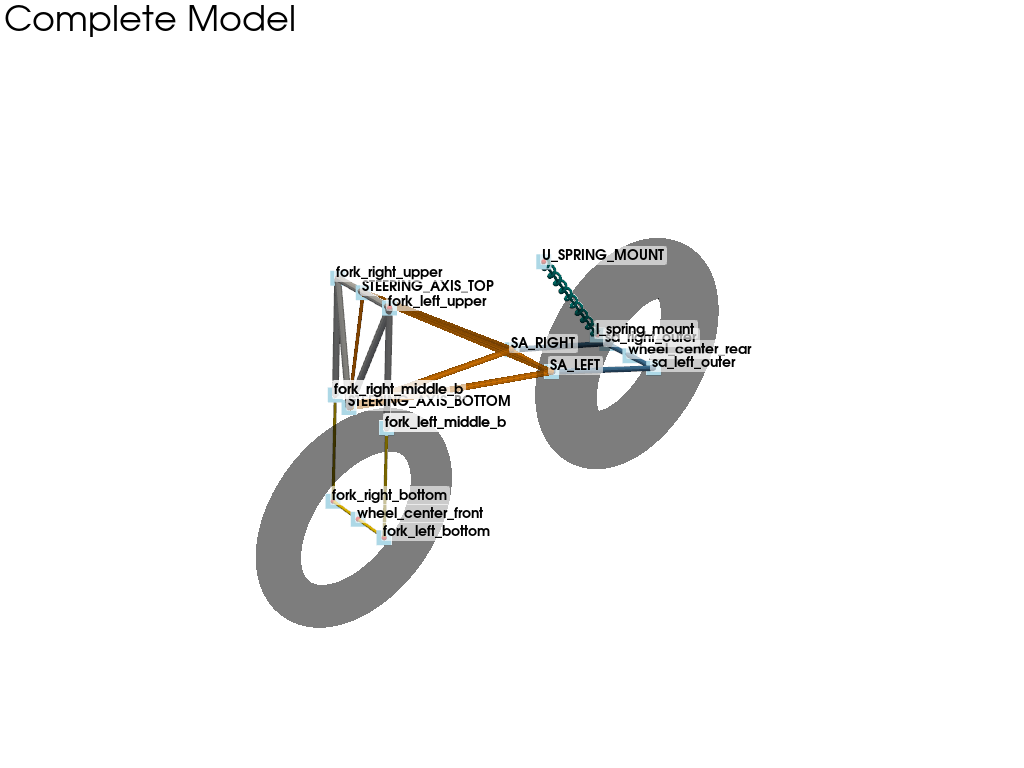
This example demonstrates the complete visualization of a motorcycle CAD model, highlighting its front, rear, and central assembly structures. Detailed here are the crucial kinematic points used throughout internal analyses, defining everything from the steering axis to the swingarm connections.
By orchestrating discrete components—such as forks, shock mounts, and custom-oriented wheels—the script illustrates how the discrete mechanical sub-systems seamlessly combine to form a full 3D representation of the motorcycle chassis.
Import necessary libraries#
import numpy as np
import pyvista as pv

from pymycar.Cad.MotorCycle.front_assembly import fork_front_suspension
from pymycar.Cad.MotorCycle.rear_assembly import swingarm_cad_base, rear_suspension_cantilever
from pymycar.Cad.MotorCycle.frame import frame_cad_base
from pymycar.Cad.MotorCycle.wheel import motorcycle_wheel
Define the Motorcycle Configuration#
A dictionary containing the coordinates (x, y, z) in mm for key points across the motorcycle chassis. In this example, all the points are refering to the center of gravity (point 0, 0, 0)
data = {
    # --- Front assembly ---
    "wheel_center_front": np.array([650.0,   0.0,   -520.0]),
    "STEERING_AXIS_BOTTOM": np.array([650.0, 0.0,  -100.0]),
    "STEERING_AXIS_TOP":    np.array([570.0, 0.0,  250.0]),
    "fork_right_upper":  np.array([570.0, -110.0, 250.0]),
    "fork_left_upper":   np.array([570.0,  110.0, 250.0]),
    "fork_right_bottom": np.array([650.0, -120.0, -520.0]),
    "fork_left_bottom":  np.array([650.0,  120.0, -520.0]),
    # --- Rear assembly ---
    "wheel_center_rear": np.array([-600.0,   0.0,  -520.0]),
    "SA_RIGHT": np.array([-100.0, -90.0, -300.0]),
    "SA_LEFT":  np.array([-100.0,  90.0, -300.0]),
    "sa_right_outer": np.array([-600.0, -110.0, -520.0]),
    "sa_left_outer":  np.array([-600.0,  110.0, -520.0]),
    "U_SPRING_MOUNT": np.array([-150.0, 0.0,  50.0]),
    "l_spring_mount": np.array([-420.0, 0.0, -350.0]),
}
Build the 3D Assemblies#
# --- Front Assembly ---
# Create the front wheel and the steering/fork assembly
ringradius_front = 300.0  # Example ring radius for the wheel
crosssectionradius_front = 65.0  # Example cross-section radius for the wheel
wheel_front = motorcycle_wheel(data["wheel_center_front"], data["fork_right_bottom"], data["fork_left_bottom"], ringradius_front, crosssectionradius_front)
steer_axis, U_form_upper, U_form_bottom = fork_front_suspension(data)

# --- Rear Assembly ---
# Create the rear wheel, swingarm, and rear suspension system
ringradius_rear = 330.0  # Example ring radius for the wheel
crosssectionradius_rear = 105.0  # Example cross-section radius for the wheel
wheel_rear = motorcycle_wheel(data["wheel_center_rear"], data["SA_RIGHT"], data["SA_LEFT"], ringradius_rear, crosssectionradius_rear)
# pv.Cylinder(center=data["wheel_center_rear"], direction=(0, 1, 0), height=50, radius=200)
swingarm = swingarm_cad_base(data, index=None)
rear_suspension = rear_suspension_cantilever(data, index=None)

# --- Frame ---
# Build the main motorcycle chassis
frame = frame_cad_base(data, index=None)
Visualization setup#
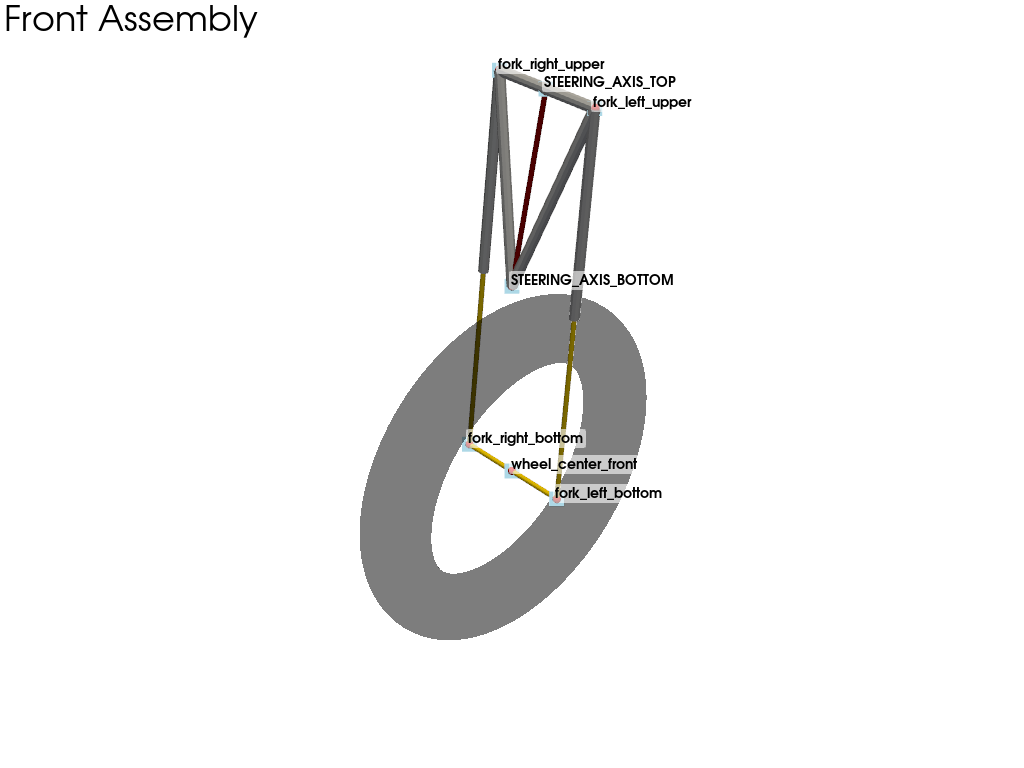
Display three separate plots sequentially: 1) Front Assembly 2) Rear Assembly 3) Complete Model
Front Assembly#
plotter_front = pv.Plotter(title="Front Assembly")
plotter_front.add_text("Front Assembly", font_size=14)
plotter_front.add_mesh(steer_axis, color="darkred", name="Steering Axis F")
plotter_front.add_mesh(U_form_upper, color="silver", name="Fork Upper F")
plotter_front.add_mesh(U_form_bottom, color="gold", name="Fork Bottom F")
plotter_front.add_mesh(wheel_front, color="black", opacity=0.3, name="Front Wheel F")
for key in ["wheel_center_front", "STEERING_AXIS_BOTTOM", "STEERING_AXIS_TOP",
            "fork_right_upper", "fork_left_upper", "fork_right_bottom", "fork_left_bottom"]:
    plotter_front.add_mesh(pv.Sphere(radius=8, center=data[key]), color='red')
    plotter_front.add_point_labels([data[key]], [key], point_size=15, font_size=14, text_color='black', shape='rounded_rect', shape_opacity=0.6, shape_color="white", always_visible=True)
plotter_front.show()
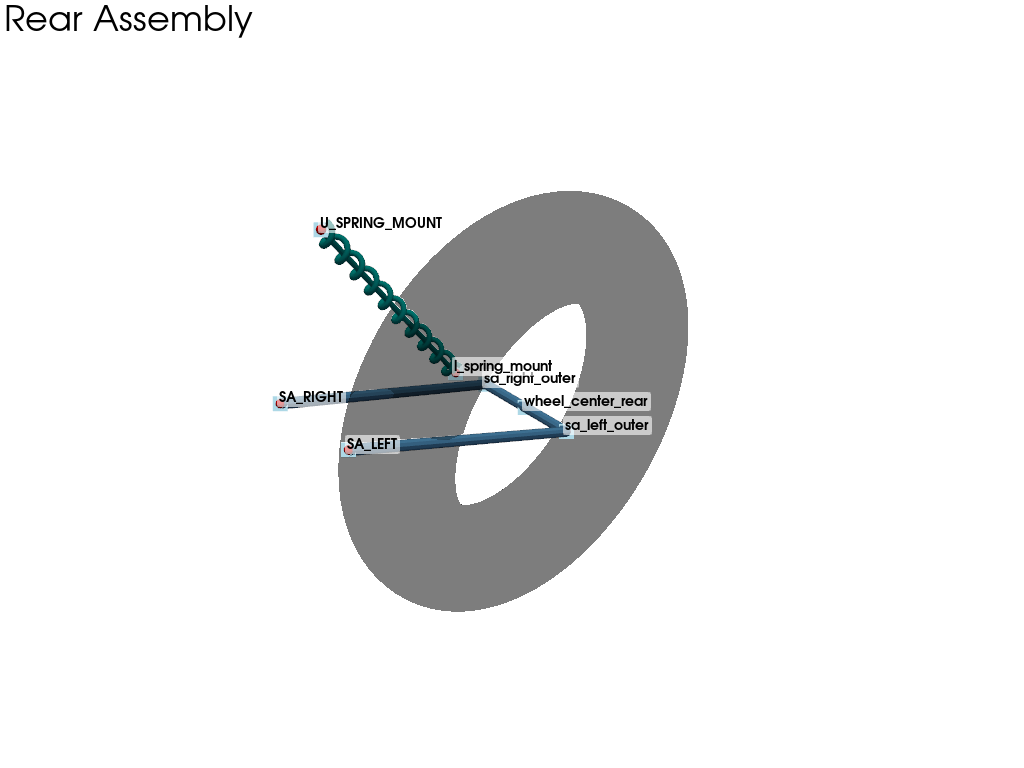
Rear Assembly#
plotter_rear = pv.Plotter(title="Rear Assembly")
plotter_rear.add_text("Rear Assembly", font_size=14)
plotter_rear.add_mesh(swingarm, color="steelblue", name="Swingarm R")
plotter_rear.add_mesh(rear_suspension, color="teal", name="Rear Suspension R")
plotter_rear.add_mesh(wheel_rear, color="black", opacity=0.3, name="Rear Wheel R")
for key in ["wheel_center_rear", "SA_RIGHT", "SA_LEFT",
            "sa_right_outer", "sa_left_outer", "U_SPRING_MOUNT", "l_spring_mount"]:
    plotter_rear.add_mesh(pv.Sphere(radius=8, center=data[key]), color='red')
    plotter_rear.add_point_labels([data[key]], [key], point_size=15, font_size=14, text_color='black', shape='rounded_rect', shape_opacity=0.6, shape_color="white", always_visible=True)
plotter_rear.show()
Complete Model#
plotter_comp = pv.Plotter(title="Complete Model")
plotter_comp.add_text("Complete Model", font_size=14)
plotter_comp.add_mesh(frame, color="darkorange", opacity=0.9, name="Frame")
plotter_comp.add_mesh(steer_axis, color="darkred", name="Steering Axis")
plotter_comp.add_mesh(U_form_upper, color="silver", name="Fork Upper")
plotter_comp.add_mesh(U_form_bottom, color="gold", name="Fork Bottom")
plotter_comp.add_mesh(swingarm, color="steelblue", name="Swingarm")
plotter_comp.add_mesh(rear_suspension, color="teal", name="Rear Suspension")
plotter_comp.add_mesh(wheel_front, color="black", opacity=0.3, name="Front Wheel")
plotter_comp.add_mesh(wheel_rear, color="black", opacity=0.3, name="Rear Wheel")

for name, coord in data.items():
    plotter_comp.add_mesh(pv.Sphere(radius=8, center=coord), color='red')
    plotter_comp.add_point_labels([coord], [name], point_size=15, font_size=14, text_color='black', shape='rounded_rect', shape_opacity=0.6, shape_color="white", always_visible=True)
plotter_comp.show()
Total running time of the script: (0 minutes 2.162 seconds)